

Managing Your Shop

A strong, up-to-date profile builds buyer trust and makes your shop more discoverable on ThrowbackBuys. Keeping your profile polished helps buyers feel confident shopping with you—and can even improve your product’s visibility in search.
Keep Your Information Current: Check your Profile tab regularly to ensure all details are accurate and up to date.
Shop Best Practices
- Make sure your contact info, profile image, and store details are correct and professional.
- A clear, recognizable profile image helps buyers feel more connected to your shop.
- Keep your store details concise but engaging—this is your chance to introduce your brand and style.
- A well-maintained profile can boost customer engagement and improve search rankings for your products.
🏖️ Out of town? Set Your Shop to Vacation Mode
Don't leave buyers hanging! Let them know to expect a few extra days of shipping & handling time if they make a purchase while you're away and unable to fulfil orders in a timely manner. It's easy:
- After logging into the Seller Portal, navigate to your Profile
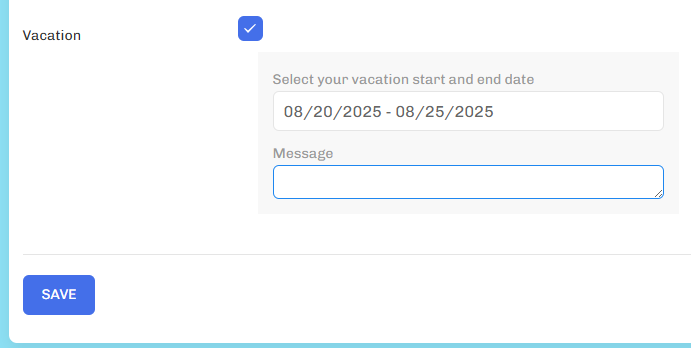
- Under the Information section, scroll down until you reach a checkbox labeled "Vacation"
- Enter the duration of your absense and write a custom message
- Hit Save
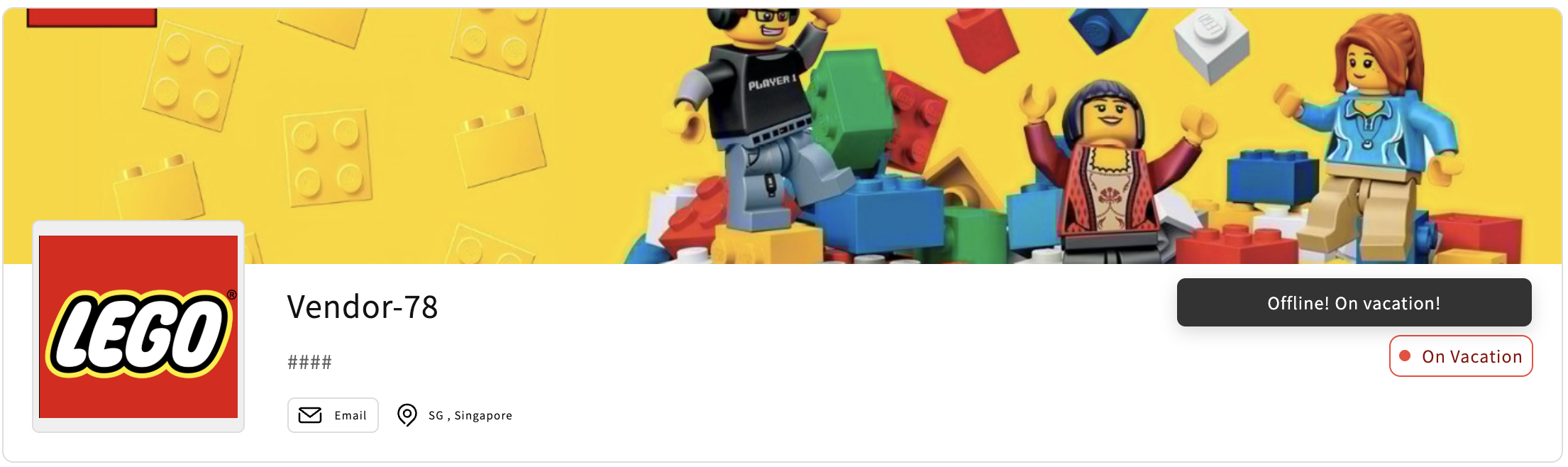
- Your vacation label and custom "away message" will display on your profile beggining on the first day of your absence and automatically end on the last day.
- While away, your products will be hidden from view. Not to worry - they've just gone into Draft mode. They'll switch back to Active upon your return. This is the default behavior of the Vacation feature.
- If you'd prefer to keep your shop live while you're away, you can override this by manually switching your products to Live during your vacation window. Your Vacation message will still be visible
A solid profile = more trust, better visibility, and higher chances of making a sale. If you have questions or need help, reach out in #seller-support on Discord or email [email protected].